
The dialer was the commodity. The integration was the moat.
Building a cold-calling platform for a two-sided marketplace, and why the phone turned out to be the easy part.
FarmToYou is a two-sided marketplace, and a marketplace with no supply is just a website. The demand side, shoppers who want food direct from local farms and producers, mostly takes care of itself once the listings are good. The supply side does not. Producers are busy people running farms, breweries, and small food businesses, and almost none of them wake up looking for another sales channel. Someone has to go and find them, one at a time, and make the case. That someone was me, and the motion is the least glamorous part of building a marketplace: cold outreach to a list of strangers. I had two non-negotiables going in. It had to be cheap enough that I could run it myself between everything else, and every call had to leave a permanent trace on the customer record instead of evaporating inside a standalone dialer the moment I hung up.
The problem
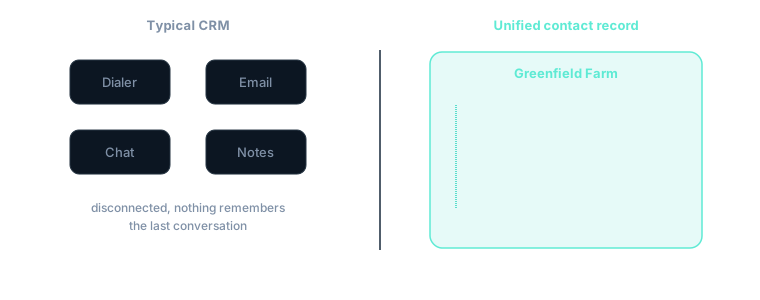
A cold call is only worth making if its outcome is captured where the next conversation will happen. That sounds obvious, and almost every off-the-shelf setup gets it wrong. The default stack splits the relationship in two: a dialer owns the call, and a separate tool like Intercom owns the chat and the email. The producer I just spoke to has a note living in one system and an email thread living in another, and the two never reconcile. Three weeks later I pick the relationship back up with half the context missing. Multiply that across a few hundred producers and the list stops being an asset and becomes a pile of half-remembered conversations.
The second half of the problem is compliance, and this is where most people underestimate the work. Cold calling in the US is genuinely regulated. There is TCPA, there are do-not-call obligations, there are calling-hour windows you are not allowed to cross, and there is the newer, quieter killer: the carrier-applied "Spam Likely" label. None of these is a checkbox in a settings panel. They are constraints you have to design the system around, because the cost of getting them wrong ranges from a dead pickup rate to actual legal exposure. Treating compliance as engineering, not paperwork, was the part that took the longest and the part I am most glad I did properly.
Why I did not just rent one
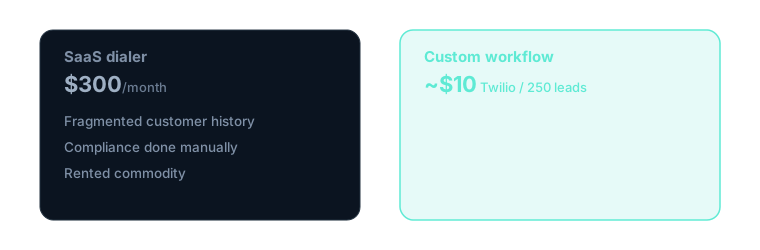
There are perfectly good dialers you can rent, and for a moment I almost did. The reason I did not comes down to where the value actually sits. A rented dialer solves the easy part, putting a call through, and leaves you to glue together the two hard parts yourself: the compliance and the single-record continuity. You end up paying a few hundred dollars a month for the easy twenty percent and still building the hard eighty percent by hand, except now it lives awkwardly split across someone else’s product and yours. Once I saw that the dialer was the commodity and the integration was the moat, build-versus-buy answered itself. I was going to have to build the part that mattered regardless, so I built the small piece in the middle too.
Validate before building anything
Before I wrote a line of dialer code I ran the motion entirely by hand. I pulled a small list, opened each prospect’s website in a browser tab, wrote myself a one-line opener for each, and dialed them off my phone with nothing but a script and a notebook. This was deliberate. The expensive mistake in a project like this is to spend three weeks building a beautiful tool to automate a motion that does not convert, and to find that out only after the tool exists. The manual pass was the cheapest possible test of the real hypothesis, which was never "can I build a dialer" but "will a producer who gets a call that clearly speaks to their specific business actually respond." The batch was small on purpose, on the order of a dozen-plus dials, so I treat the result as signal rather than a statistic: roughly one in five replied by email and about one in five engaged on the phone. That was enough to tell me the motion was real, and that the part doing the work was the per-business personalization, not the act of dialing. Only then did I let myself build.
The lead queue
The spine of the whole thing is a Postgres lead queue. A scraped industry list seeds it, and each row is a producer with the fields the rest of the system depends on: business name, phone, website, region, and a status that moves through the pipeline (new, enriched, queued, called, then a disposition). Two things about the queue mattered more than I expected. The first was deduplication: scraped lists are full of the same business listed twice under slightly different names or numbers, and calling someone twice is the fastest way to look like exactly the spammer you are trying not to be, so dedupe by phone and by domain happens on the way in. The second was that the queue, not the dialer UI, is the source of truth for who may be called. A contact’s callable state lives in the data, so a do-not-call flag or a closed calling-hours window takes them out of rotation no matter what the interface happens to be showing.
Reading the prospect before the phone rings
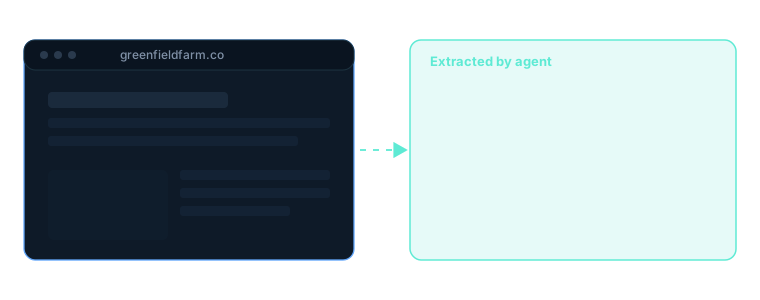
The motion starts before the call, with an agent that works the queue and reads each prospect’s actual website. Not the meta description, not a cached snippet, the live site. It pulls out what this business actually grows or makes, who they sell to, and how they sell today, whether that is a CSA box, a farmers’ market stall, wholesale to restaurants, or their own online store. That read becomes the opener. Instead of "hi, are you a local producer," the call starts with something only their business would hear, and the difference in how the first ten seconds go is not subtle. It is the same website-read agent I describe in the companion piece on personalization; here it sits at the front of the call workflow rather than the email one, but the principle is identical: the machine does the reading a good rep would have done if a good rep had the hours.
The dialer, in the browser
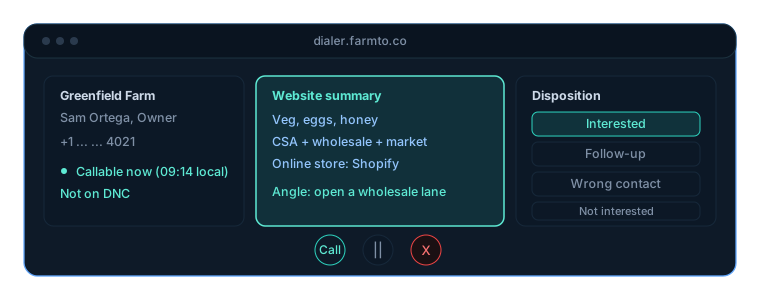
The dialer itself runs in the browser over Twilio’s Voice SDK, so there is no handset and no desk phone, just a tab. When I open it, the backend mints a short-lived Twilio access token, the browser registers as a voice client, and clicking a lead places the call through a TwiML app that bridges my browser to the prospect’s number. I built two modes. Preview mode shows me the prospect and their website read and waits for me to hit dial, which is how I worked while the script was still finding its shape. Power mode advances through the queue with less ceremony, which is where you want to be once the opener is muscle memory and the only bottleneck left is dials per hour. The browser-first choice was not cosmetic: it means the same screen that places the call also shows the website read and captures the outcome, so I am never tabbing between three tools in the middle of a conversation.
Answering-machine detection, and its tradeoff
A large share of cold dials go to voicemail, and sitting through greetings is the single biggest waste of time in the motion. Twilio’s answering-machine detection screens every call and only bridges me in on a human pickup. This is a genuine tradeoff, not free magic. AMD works by listening to the first moments of a call before it decides human or machine, which adds a short delay on connect, and it is not perfect: it will occasionally clip the start of a real "hello" or misread a curt person as a machine. I tuned it toward not wasting my time and accepted the occasional slightly delayed hello as the price, because the alternative, listening to hundreds of voicemail greetings by hand, is exactly the kind of work I was trying to engineer away.
Compliance, written as code
This is the part I am proudest of, precisely because it is invisible when it works. Every compliance rule lives in the system, not in my memory:
- A hard calling-hours guard. The dial button is disabled outside 8am–9pm in the prospect’s local time, derived from their number, so I physically cannot place a call into the wrong window even if I have lost track of what time it is two timezones away.
- A permanent do-not-call block. One button takes a contact out of every future rotation for good, and because callable state lives in the queue rather than the UI, the block holds no matter how the list is later re-imported or re-sorted.
- STIR/SHAKEN registration. The numbers are registered and attested so carriers can verify the call genuinely originates from a legitimate business, which is the mechanism that keeps "Spam Likely" off the recipient’s screen.
- A number-warming ramp. New numbers do not start at full volume; call counts ramp up gradually so a fresh number builds a normal-looking pattern instead of spiking on day one and getting flagged.
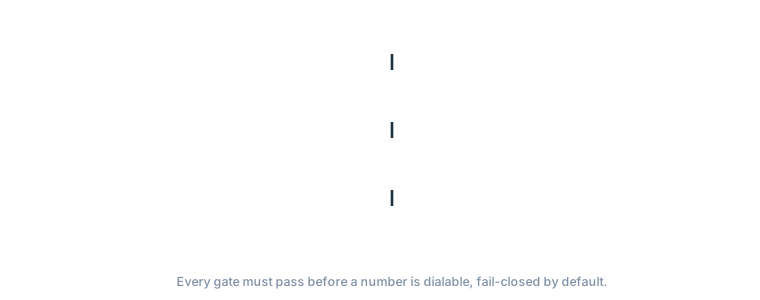
Each of these is a small piece of engineering. Together they are the difference between a sustainable outreach motion and one that quietly poisons its own phone numbers inside a week.
Dispositions, and the one-record rule
Every call ends with a disposition logged before the next number can dial: booked, callback, not-a-fit, or do-not-call. Forcing the disposition before advancing was a deliberate constraint, because the moment you let yourself dial the next lead and tell yourself you will log the last one later, you never do, and the data rots. From there, every outcome syncs back into Intercom as an event on the producer’s contact. The call, the chat, and the email now sit on one record. When I follow up two weeks later, the entire history is in one place, in the same tool where the rest of the relationship already lives. That single-record continuity was the whole reason I built this instead of renting, and it is the thing a bolted-on dialer structurally cannot give you.
One personalized flow, end to end
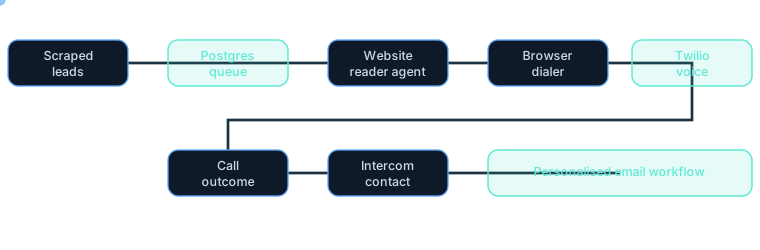
Put the pieces in order and the dialer turns out to be only the middle of the motion. The agent reads the prospect and shapes the opener. The call happens, screened by AMD and bounded by the compliance layer. The outcome and the agent’s read both write back to Intercom as tags and events, and those tags drop the producer into the matching email workflow, the one shaped for their situation rather than a generic blast. A wholesale-focused brewer and a farm running a CSA do not get the same follow-up, because the system already knows the difference from the website read. The result is a single journey, from the first call touch-point through to the closing email, that stays personalized to that producer the whole way through. It is one campaign, shaped per business, not a sequence with a {{first_name}} token doing the pretending.
What it cost, what it returned
Once it worked, the economics were almost funny. The marginal cost of a 250-lead pass came out around ten dollars in Twilio usage. The rented dialer-plus-comms stack I would have otherwise assembled runs a few hundred dollars a month for the same job, and still would not have given me the single-record continuity or the compliance-in-code. The build took real time, most of it in the compliance layer and the Intercom sync rather than the dialer itself, but it is now a standing asset I own outright. Every future outreach pass runs at near-zero marginal cost on infrastructure I control.
Under the hood
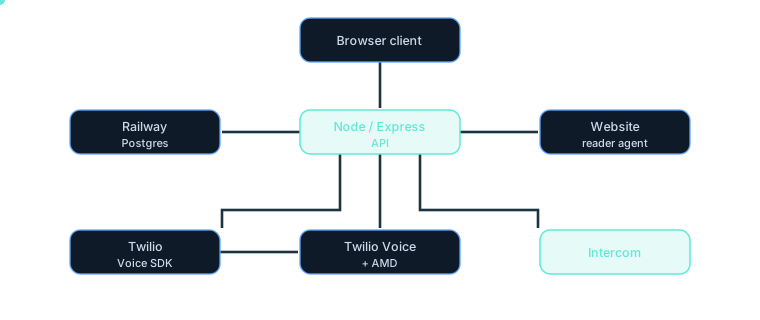
Nothing in the stack is exotic. The leverage is in how the pieces connect, not in any single component: a browser client, a small Node/Express API over Postgres, Twilio for voice, an agent for research, and Intercom as the system of record.

The takeaway
The moat was never the dialer. You can rent one of those this afternoon. The moat is that the call outcome lands on the same contact record as every other channel, that the next email is already shaped by what that specific producer needs, and that the compliance lives in code rather than in a checklist nobody actually follows under pressure. Own the thin layer where your channels converge, and the commodity pieces around it stay cheap and swappable. Rent that layer back as three disconnected SaaS tabs and you will pay more, every month, for a worse version of the one thing that actually matters.
Node/Express, Twilio Voice SDK + AMD, Postgres on Railway, Intercom contact sync, a website-reader agent.
- Twilio Voice
- Cold outreach
- Intercom